Introduction
Starting a smart home in 2026 does not have to mean rewiring rooms, installing a dozen apps or committing to an expensive automation system.
A good starter kit should let you begin with a few useful devices, learn how automations work and expand gradually without replacing everything later.
For this comparison, we prioritised ease of setup (25%), beginner friendliness (20%), compatibility (20%), value (15%), expansion potential (10%), and reliability and support (10%). We used these factors to guide the ranking rather than creating artificial numerical scores.
Quick Answer
Best overall: Philips Hue Essential Starter Kit
Best value: IKEA KAJPLATS Starter Kit
Easiest basic setup: IKEA KAJPLATS Starter Kit
Best for broad compatibility: Philips Hue Essential Starter Kit
Best for future expansion: Aqara Camera Protect Kit Y100
Key Takeaways
- Matter does not mean hub-free. Some Matter products still require a Matter controller, while Matter-over-Thread products normally need a Thread border router.
- A proprietary hub is not automatically a disadvantage. Philips Hue demonstrates how a hub can simplify automations while keeping dozens of devices off the main Wi-Fi network.
- Very inexpensive starter kits can become more expensive once you add the hub needed for app and remote control.
- Security cameras are where subscription costs become most relevant. Lighting, switches and sensors generally work without recurring payments.
- Check regional versions carefully. Bulb fittings, plug types, wireless frequencies and bundle contents differ between countries.
- For beginners, a mature app and clear support documentation can be more valuable than having the longest specification sheet.
Research Summary and Selection Method
Research and information checked: October 2026
More specifically, the live information in this comparison was checked on 6 October 2026.
The shortlist was drawn from Philips Hue, IKEA Home Smart, Aqara, Tapo, SwitchBot, Nanoleaf and other major ecosystems. We excluded older bundles where a current replacement or better-supported alternative was available.
For example, Aqara’s older generic US Home Control Starter Kit currently contains no products, so the active Camera Protect Kit Y100 was evaluated instead.
No hands-on testing by this editorial review is claimed. Setup assessments combine documented installation requirements with current manufacturer guidance and, where useful, professional review evidence.
Smart Home Starter Kit Comparison
| Starter Kit / Ecosystem | Best For | Approx. Starting Price* | Hub Required? | Matter / Thread | Alexa | Google Home | Apple Home | Beginner Setup | Subscription |
|---|---|---|---|---|---|---|---|---|---|
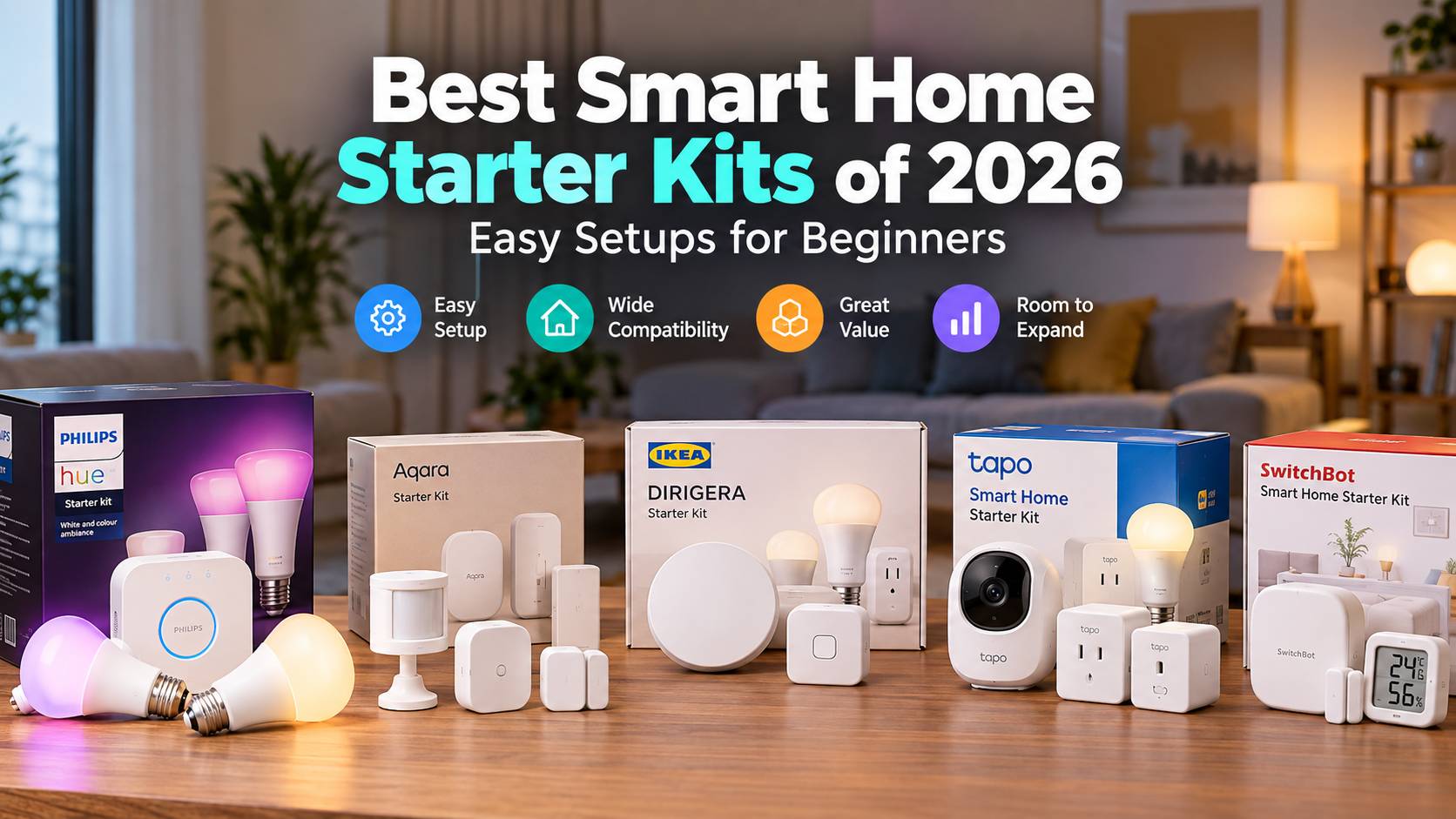
| Philips Hue Essential Starter Kit | Best overall | US$99.99 | Included | Matter via Bridge; Zigbee internally; no Thread required | Yes | Yes | Yes | Easy | No for lighting |
| Aqara Camera Protect Kit Y100 | Security and expansion | US$119.99 | Included in G3 camera | Matter bridge; Zigbee child devices | Yes | Yes | Yes | Easy–moderate | Optional cloud services |
| IKEA KAJPLATS Starter Kit | Value and basic setup | US$14.99 | Optional for remote-only use | Matter over Thread | Yes | Yes | Yes | Very easy initially | No |
| Tapo T31 KIT | Budget sensors | US$41.99 sale / US$59.99 list | Included | Matter-capable H100 bridge; sensors use Sub-G | Yes | Yes | Yes via Matter | Easy | No for sensors |
| SwitchBot Hub 2 + Bot Combo | Retrofitting existing devices | US$129.97 | Included | Matter through Hub 2 over Wi-Fi; no Thread | Yes | Yes | Yes via Matter | Moderate | No for core functions |
*Prices are current manufacturer/direct-store examples from the US or international USD storefront and can differ substantially by country and promotion.
Ranked Reviews
1. Philips Hue Essential Starter Kit — Best Overall
Best for: Beginners who want the safest all-round starting point.
Typical starting price: About US$99.99 for the two-bulb Essential starter kit in the US.
What is included: Two Essential E26 colour and tunable-white bulbs plus a Hue Bridge.
Works with: Amazon Alexa, Google Home, Apple Home, Samsung SmartThings and Matter-compatible ecosystems.
Hub requirement: Yes; the Bridge is included.
Matter / Thread support: Matter is provided through the Hue Bridge. Hue bulbs communicate primarily through Zigbee; this kit does not require Thread.
Why It Made the List
Hue ranks first because its Bridge, app, automations and third-party integrations make the jump from two bulbs to a larger system relatively straightforward.
The Bridge can manage up to 50 lights and 12 accessories, while Matter support lets Hue participate in broader smart-home ecosystems.
Setup Experience
Install the bulbs, connect the Bridge to your router with Ethernet and follow the Hue app’s guided setup. Philips’ current setup instructions are clear and beginner-oriented.
Pros
- Mature and well-documented ecosystem
- Bridge included
- Strong Apple, Google, Alexa and SmartThings compatibility
- Large lighting and accessory range
Cons
- More expensive than IKEA or Tapo
- Bridge needs an Ethernet connection
- Essential bulbs do not dim as low as standard premium Hue bulbs
Expansion Potential
Excellent for lighting, switches, motion/contact sensors and Hue security products. Hue remains more lighting-focused than Aqara or Tapo, however.
Subscription or Ongoing Costs
No subscription is required for normal smart-lighting functionality. If you later add Hue Secure cameras, optional US plans currently extend video history and other security features.
Best For
Choose Hue if you want an established system that is simple enough for your first room but capable of growing into whole-home lighting.
2. Aqara Camera Protect Kit Y100 — Best for Security and Expansion
Best for: Beginners interested in sensors, security and automation rather than lighting alone.
Typical starting price: US$119.99 from Aqara’s US store when checked.
What is included: Camera Hub G3, motion sensor, door/window sensor and vibration sensor.
Works with: Aqara Home, Apple Home, Alexa, Google Home, SmartThings and Home Assistant, with functionality varying by device/platform.
Hub requirement: Included; the G3 camera also functions as a Zigbee hub.
Matter / Thread support: The G3 works as a Matter bridge for supported child devices. The included sensors use Zigbee rather than Thread.
Why It Made the List
Few beginner bundles demonstrate automation as effectively. A door opening, motion event or vibration can trigger alerts, recording or other Aqara devices.
Setup Experience
The camera connects to Wi-Fi and acts as the hub for the battery-powered sensors. There is more configuration than with smart bulbs, but no major electrical work is required.
Pros
- Camera plus three different sensor types
- Strong Apple Home integration
- Local microSD recording available
- Large ecosystem of sensors, switches, locks and lighting
Cons
- More security-focused than general-purpose
- Some Aqara Zigbee accessories remain dependent on an Aqara hub
- Newer Thread accessories may eventually justify adding a newer Aqara Thread-capable hub
Expansion Potential
Very strong. Aqara now covers cameras, locks, lighting, environmental sensors, presence sensors, switches and Matter/Thread products. The ecosystem is considerably broader than a simple lighting system.
Subscription or Ongoing Costs
Aqara supports local microSD recording. The Y100 bundle also advertises a trial of its HomeGuardian cloud service; paid cloud features are optional. HomeKit Secure Video requires an eligible iCloud+ plan if you choose to use Apple’s recording service.
Best For
Choose Aqara if you expect your first sensors to become the foundation of a larger automation or security system.
3. IKEA KAJPLATS Starter Kit — Best Value
Best for: First-time buyers who want inexpensive smart lighting with minimal initial setup.
Typical starting price: US$14.99 for the colour-and-white-spectrum E26 kit; a UK E27 version was £12 when checked.
What is included: One smart bulb and one pre-paired remote.
Works with: Matter-compatible systems including Amazon, Apple, Google, Homey and Samsung when connected through suitable Matter/Thread infrastructure.
Hub requirement: No for included remote control; required infrastructure is needed for full app/network control.
Matter / Thread support: Matter over Thread.
Why It Made the List
The bulb and remote are already paired. For basic smart-lighting control, you can screw in the bulb and start using it without opening an app.
Setup Experience
Initial remote control is exceptionally simple. Full smart-home integration is more complicated because Matter-over-Thread requires a Thread border router, such as IKEA’s DIRIGERA hub or another suitable ecosystem device.
IKEA’s new Matter range experienced connectivity complaints during its early 2026 rollout. IKEA subsequently issued multiple DIRIGERA updates addressing Matter onboarding, Thread routing and stability, including a July release specifically describing further Matter and Thread stability improvements.
Pros
- Extremely low entry price
- Pre-paired remote
- Native Matter-over-Thread design
- Growing range of inexpensive IKEA sensors and controls
Cons
- Full app control requires additional infrastructure
- Early 2026 Matter/Thread onboarding was less consistent than expected
- One-bulb bundle is limited without expansion
Expansion Potential
Good and improving. IKEA now offers Matter smart bulbs, plugs, buttons and sensors, and publishes firmware release information for its Matter products.
Subscription or Ongoing Costs
No subscription is required. IKEA also states that basic smart-home functions are designed to continue without depending on a remote server.
Best For
Choose KAJPLATS if budget matters most and you want to begin with one room before deciding whether a larger smart-home system is worthwhile.
4. Tapo T31 KIT — Best Budget Sensor Starter Kit
Best for: Affordable door/window monitoring and simple automations.
Typical starting price: US$41.99 promotional / US$59.99 list price when checked.
What is included: One Tapo H100 hub, three T110 contact sensors, batteries, adhesive strips and quick-start documentation.
Works with: Tapo plus major platforms through supported integrations/Matter, including Alexa, Google Home, Apple Home and SmartThings.
Hub requirement: Yes; included H100.
Matter / Thread support: H100 supports Matter bridging. Its battery sensors communicate with the hub using Tapo’s low-power Sub-G protocol, not Thread.
Why It Made the List
It gives beginners a real automation hub and three useful sensors for less than many single premium smart-home products.
Setup Experience
Plug in the H100, connect it to 2.4 GHz Wi-Fi and pair the sensors in the Tapo app. Sensors attach using adhesive rather than wiring.
Pros
- Low purchase price
- Three sensors plus hub
- Tool-free installation
- H100 can support up to 64 compatible Tapo devices
Cons
- Starter bundle focuses only on contact sensing
- Proprietary Sub-G communication between sensors and hub
- Some cross-platform features depend on Matter/platform implementation
Expansion Potential
Strong for the price. Tapo offers lights, plugs, switches, sensors, cameras and doorbells under one app, although not every device uses the H100.
Subscription or Ongoing Costs
The T31 sensor kit itself does not require Tapo Care. Tapo Care is principally an optional cloud service for compatible cameras and doorbells.
Best For
Choose Tapo if you want low-cost sensors now and may later add plugs, lighting or cameras.
5. SwitchBot Hub 2 + Bot Combo — Best for Making Existing Devices Smart
Best for: Renters and anyone who wants to automate existing physical switches or appliances.
Typical starting price: About US$129.97 from SwitchBot’s international store.
What is included: SwitchBot Hub 2 and SwitchBot Bot.
Works with: Alexa, Google Assistant, SmartThings and other integrations; Apple Home access is available for supported SwitchBot devices through Matter.
Hub requirement: Included.
Matter / Thread support: Hub 2 provides Matter integration over Wi-Fi. It is not a Thread border router and supports 2.4 GHz Wi-Fi.
Why It Made the List
SwitchBot solves a different problem: instead of replacing an appliance or wall switch, the Bot physically presses its existing button.
Setup Experience
The hub is straightforward, but Bot placement can require trial and error so that its mechanical arm presses the switch correctly. Professional testing has also identified Bot positioning as the fiddliest part of setup.
Pros
- Makes some existing appliances smart
- No electrical rewiring
- Matter support through Hub 2
- Ecosystem includes locks, curtains, blinds, sensors and robots
Cons
- Expensive for a hub plus one actuator
- Bot can look less integrated than replacing a switch
- Correct physical positioning sometimes takes experimentation
Expansion Potential
Good, particularly for curtains, blinds, locks and retrofit automation. Hub 2 can expose a growing list of supported SwitchBot devices to Matter ecosystems.
Subscription or Ongoing Costs
Core Bot and Hub 2 control does not require a recurring subscription.
Best For
Choose SwitchBot if replacing existing switches or appliances is impractical, especially in rented accommodation.
Pros and Cons Summary
| Kit | Main Advantages | Main Limitations |
|---|---|---|
| Philips Hue | Mature ecosystem, dependable integrations, excellent expansion | Higher starting price, Ethernet Bridge |
| Aqara Y100 | Multiple sensor types, security, Apple support, local storage | More complex, security-oriented |
| IKEA KAJPLATS | Very cheap, pre-paired, Matter over Thread | Extra infrastructure for app control |
| Tapo T31 | Hub + three sensors at low cost, easy installation | Sensor-focused, proprietary sensor radio |
| SwitchBot Hub 2 + Bot | Retrofit existing devices, no wiring | Costly and mechanically less elegant |
Which Smart Home Starter Kit Should You Choose?
Choose Philips Hue if: you want the least risky all-round entry into a mature smart-lighting ecosystem.
Choose Aqara if: sensors, security, Apple Home and advanced automations matter more than lighting alone.
Choose IKEA KAJPLATS if: you want to spend as little as possible and experiment with smart lighting.
Choose Tapo T31 if: you want affordable door/window monitoring with a hub that can support further automation.
Choose SwitchBot if: you want to automate existing switches and appliances rather than replace them.
Beginner Buying Guide
Ecosystem Compatibility
Decide whether your household primarily uses Alexa, Google Home, Apple Home or SmartThings before buying. Matter reduces lock-in but does not guarantee that every advanced feature appears in every app.
Hub vs Hub-Free Systems
Wi-Fi devices can appear simpler because they connect directly to the router. Hubs add hardware but can reduce Wi-Fi congestion and allow low-power sensors to run on batteries for longer.
Matter and Thread
Matter is an interoperability standard telling compatible smart-home products how to work together.
Thread is a low-power mesh networking technology that some Matter products use.
A Matter-over-Thread device therefore normally needs a Thread border router to connect its Thread network to the rest of your home network. The technologies are related but not interchangeable.
Wi-Fi Requirements
Many smart hubs and accessories still require 2.4 GHz Wi-Fi, even when your router also supports 5 GHz. SwitchBot Hub 2 and Tapo H100 are notable examples.
Subscription Costs
Lights, plugs and sensors rarely need subscriptions. Cameras and doorbells are more likely to charge for extended cloud recordings, advanced AI alerts or longer history.
Expansion
Before buying, check whether the same ecosystem offers the next devices you are likely to want—perhaps motion sensors, smart plugs, locks, cameras or switches.
Smart Home Starter Kit Market Teardown
| Brand | Positioning and Beginner Strategy | Interoperability Strategy | Pricing / Recurring Revenue | Trust, Support and Expansion |
|---|---|---|---|---|
| Philips Hue | Premium-but-simple smart lighting with highly guided onboarding | Zigbee ecosystem bridged to Matter, Apple, Google, Alexa and SmartThings | Higher hardware margins; optional Hue Secure subscriptions | Extensive documentation, established app, large lighting/accessory range |
| Aqara | Powerful automations and security at relatively accessible device prices | Zigbee plus growing Matter/Thread portfolio | Hardware-led with optional cloud/security services | Broad sensor/lock/camera portfolio and strong Apple positioning |
| IKEA | Smart-home technology at mass-market furniture-store pricing | Moving aggressively toward Matter over Thread | Low-cost hardware; no major subscription dependency | Strong retail reach; visible firmware/support programme, although Matter launch required stability work |
| Tapo | Value-focused smart home and security managed in one app | Wi-Fi plus hub-based sensors and increasing Matter support | Aggressive hardware pricing; Tapo Care monetises cameras | Large device catalogue and extensive support documentation |
| SwitchBot | Retrofit ordinary devices instead of replacing them | Hub bridges SwitchBot products into Matter and major assistants | Higher specialist hardware pricing; core automation remains subscription-light | Distinct curtain, blind, lock and actuator products create a differentiated ecosystem |
Philips Hue’s strongest competitive advantage remains confidence: buyers know what the Bridge does, compatibility is extensively documented and the ecosystem is mature.
IKEA’s advantage is price. Its challenge is making Matter-over-Thread onboarding feel as simple as using the supplied remote.
Aqara competes on automation depth. Tapo competes on value and breadth. SwitchBot competes by making products smart that competing ecosystems often require users to replace.
Market Gaps and Opportunities
The biggest opportunity is clarity rather than another wireless standard.
Beginners still encounter confusing distinctions between a proprietary hub, Matter controller, Matter bridge and Thread border router. A brand that clearly states “what you need, what is included and what you may need later” directly on every bundle page would remove a major purchase barrier.
Other commercially meaningful gaps include:
- Starter packages combining one light, one plug and one sensor rather than several versions of the same device.
- Matter bundles where the required controller or Thread border router is clearly included.
- More automation that runs locally without a cloud dependency.
- Transparent comparison of free versus subscription camera functionality.
- Cross-platform feature matrices showing not simply “Works with Apple/Google/Alexa” but exactly which functions work.
- Beginner onboarding that tests Wi-Fi, Matter controller and Thread readiness before pairing begins.
Final Verdict
Best Overall Smart Home Starter Kit — Philips Hue Essential Starter Kit: The included Bridge, mature app, wide platform support and straightforward expansion make it the most balanced starting point.
Best Budget Choice — IKEA KAJPLATS Starter Kit: Few credible Matter-enabled starter products can match its initial purchase price, although full app integration requires extra infrastructure.
Best for Complete Beginners — IKEA KAJPLATS Starter Kit: Its pre-paired remote provides useful smart-lighting control without an account, app or pairing process.
Best for Compatibility — Philips Hue Essential Starter Kit: The Bridge provides a well-established route into Apple Home, Alexa, Google Home, SmartThings and Matter while preserving Hue’s reliable Zigbee network.
Best for Long-Term Expansion — Aqara Camera Protect Kit Y100: Aqara’s range of sensors, locks, switches, cameras and newer Matter/Thread products offers greater whole-home automation depth than a lighting-only starter system.
For most complete beginners, Philips Hue is the safest overall recommendation. IKEA is the more attractive experiment if price is the deciding factor, while Aqara is the stronger starting point for people who already know they want sensors, security and more sophisticated automation.